Agents inside the CRM.
You stay in control.
An agent reads the data you wire to it, at the pace you choose, and applies what you authorised it to do. Every run is logged, and every write waits for your approval as soon as you require it.
From the deterministic workflow to the store, then the builder. The other walkthroughs are in the demo center.
An agent is
four things.
Transparent from end to end. Each run makes one model call with a context you chose, and applies the result in the CRM.
A trigger
When the agent wakes up: a schedule, a CRM event, or you.
Some data
What it may read. Explicit sources, chosen by you.
Instructions
Your prompt, your model, your token budget.
Actions
What it may write, on the triggering record or on the ones it resolved.
When the agent
wakes up.
Three ways to fire it, all of which compose with the rest of the CRM because they share the same event vocabulary as the automations.
Scheduled
A cron schedule with its timezone: daily, weekly, monthly. A 15-minute minimum interval, and configurable catch-up for missed runs.
CRM event
The agent wakes up when something happens in the CRM, with configurable rate limiting to keep the pace under control.
Manual
An on-demand run from the interface, at any moment, to test a setting or handle an urgent case.
What it reads,
what it writes.
The agent reads exactly what you give it. You wire sources to it, you tick actions, and its reach is precisely that.
Data sources
Eight context providers
Allowed actions
Six possible writes, to tick
Every write goes
through your approval.
This is the part that matters. The product starts from a simple principle: by default, you approve every write before it reaches the CRM.
Human approval
Switched on agent by agent. Every write waits for your approval, in a dedicated queue with a configurable expiry.
Two distinct permissions
agents.approve is separate from agents.manage. Configuring an agent and approving what it writes stay two different jobs.
Action cap
A maximum number of actions per run. You set the limit, the agent respects it.
Useful runs only
The agent calls the model only when it has data to process. Otherwise it goes back to sleep, and your credits stay intact.
Full history
Context read, model response, actions applied, errors. Every run can be inspected.
Duplicate lock
Each agent runs one execution at a time, even if two triggers overlap.
Model and budget per agent
The model and the token budget are set agent by agent, case by case.
Approval queue
3 follow-up tasks
Stale deal nudges · 4 min ago
The agent explained
in plain language.
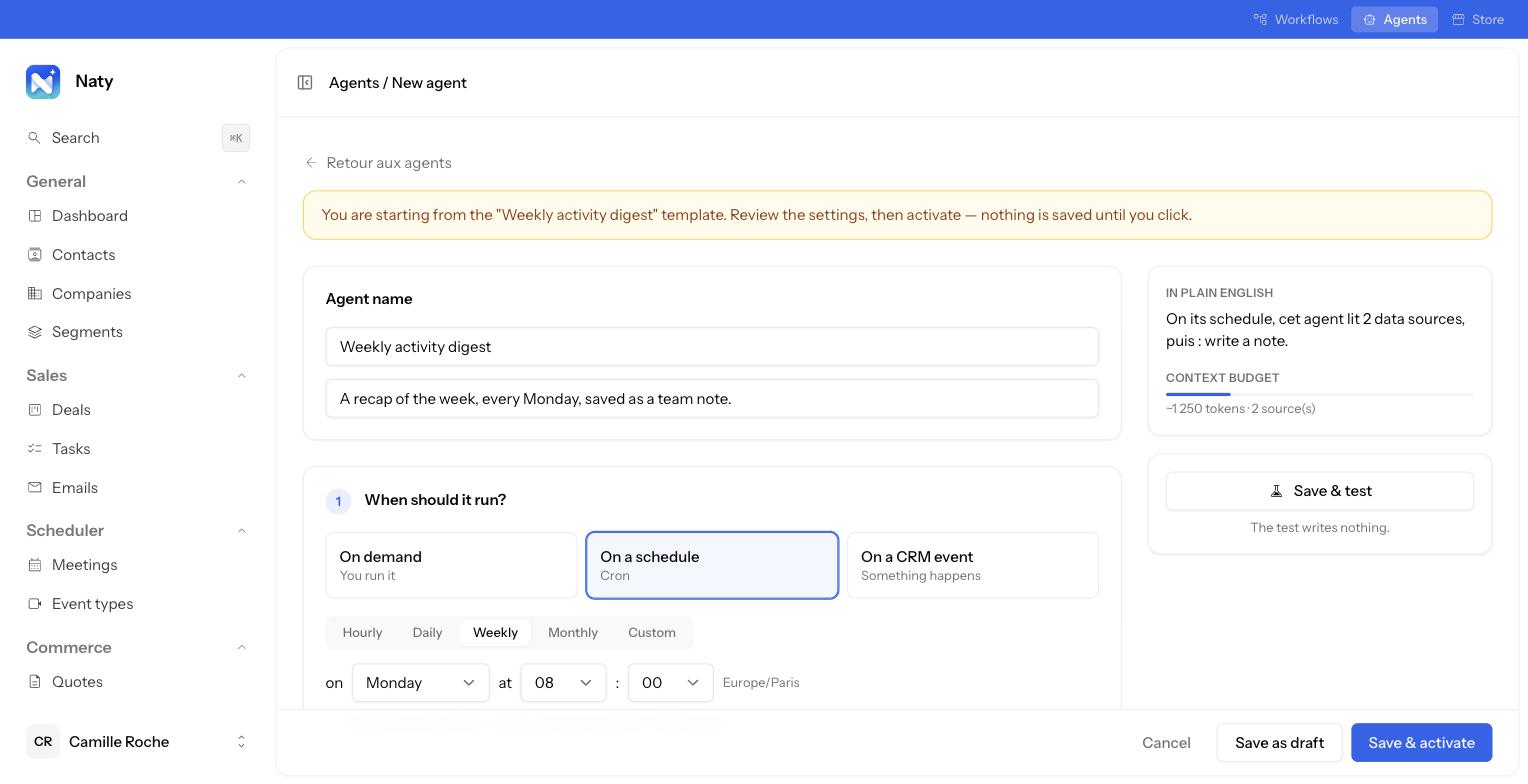
As you configure it, a panel sums up in one sentence what the agent will do, and what its context will cost in tokens.
Ten agents,
installed in one click.
You start from an agent that works, then adjust it: schedule, sources, actions, approval. Everything stays editable.
See the store demoWeekly activity digest
What moved this week, saved as a team note.
Monday 08:00
Morning brief
Today's tasks, upcoming meetings, pipeline state, by email.
Weekdays 07:00
Stale deal nudges
Spots opportunities idle for 14 days and creates the follow-up tasks.
Tuesday 09:00
Meeting follow-up
After a meeting, drafts the write-up and creates the next action.
Every hour
New lead triage
Rates every new contact hot / warm / cold and tags it.
contact.created
Form qualification
Reads each submission and creates the right task.
form.submitted
Monthly pipeline review
The state of the book, sent by email.
1st of the month
Data hygiene
Spots the records left to complete: email, phone, job title or owner.
Weekly
Won deal debrief
Captures what worked: why we won, what to take from it.
deal.won
Next step after a task
Automatically chains the following action.
task.completed
An agent, or
an automation?
Both share the same event vocabulary. The question is whether you want a model in the loop, or a stable, predictable rule.
When it has to read, summarise, decide
Writing a meeting recap, qualifying a lead, spotting what deserves a nudge: anything that means interpreting a context rather than applying a rule.
- Written output
- Context to interpret
- Human approval available
- Cost in tokens
When the rule is known in advance
Assigning an owner, adding a tag, creating a standard task: a visual trigger → conditions → actions builder, fully deterministic.
- Predictable result
- Instant execution
- Fixed cost
- Run history
An agent can in fact trigger an automation: it decides, the automation executes.
Which agent would save
you the most time?
Show us your organisation and your deals. You leave with two or three agents to install in the first week.